What is Copperhead?
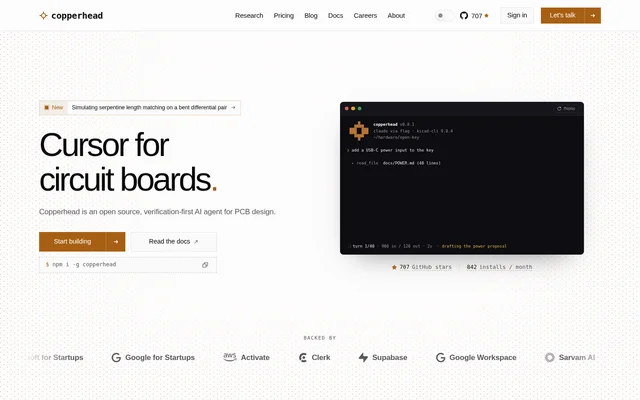
Copperhead is an open-source AI agent for designing, documenting, and verifying printed circuit boards in KiCad. Copperhead is aimed at hardware designers who work in Git and want design changes to stay consistent across schematics, bills of materials, power budgets, and project documentation. Copperhead primarily works on existing KiCad repositories and can also start a new board from a written brief.
What Copperhead can do
Copperhead turns a written request into a proposed design change and validates that proposal before unlocking edits. Copperhead makes targeted changes to KiCad source files rather than rewriting the whole schematic. After editing, Copperhead runs verification checks and compares the design with its documentation to catch inconsistencies.
- Copperhead runs KiCad electrical rule checks on schematics.
- Copperhead runs KiCad design rule checks on board layouts.
- Copperhead checks for drift between design files and documentation.
- Copperhead records decisions and changelog entries in the repository.
- Copperhead generates Gerber, drill, and STEP files.
How Copperhead works
Copperhead can initialize in an existing KiCad repository or read a brief to start a new design. In the brief-to-board workflow, each stage has its own agent run and must leave an artifact on disk before the next stage begins. Copperhead stops if a gate fails and commits each completed stage. The schematic stage calls for a clean electrical rule check, and the layout stage calls for a clean design rule check.
Who Copperhead is for
Copperhead is for hardware designers who need to make reviewable changes to KiCad projects and keep the supporting documents current. Copperhead also serves open-hardware contributors who want to publish their design files, decisions, and check results together. Design teams can use the paid CI bot to make Copperhead checks a required pull request status check.
- Revise a schematic while updating its power budget.
- Turn a board brief into a design package with firmware and documentation.
- Prepare manufacturing files and a written bring-up plan.
- Run required pull request checks with the Team CI bot.
Copperhead pricing and plans
Copperhead offers a free Apache-2.0 CLI that runs locally with a user-supplied Claude or GPT-5 API key. Cloud costs $49 per user per month and adds hosted runs for private repositories, a web viewer, and shareable check reports. Qualifying public open-hardware repositories can use Cloud for free, with managed inference included within fair-use limits.
Copperhead Team costs $49 per user per month plus a $199 monthly platform fee. Team adds required pull request checks, shared constraint libraries, and organization controls. Enterprise uses custom annual pricing and offers self-hosted or VPC deployment, Altium support, and a compliance-grade audit trail.
Copperhead strengths and limitations
Copperhead keeps the design in ordinary KiCad files and makes targeted source edits, so reviewers can inspect the resulting changes in Git. Copperhead also checks proposals against documented budgets and constraints before editing. The free CLI includes the design workflow itself; hosting, team governance, and compliance features are separate paid offerings.
- Local use requires Node 20 or newer and KiCad with kicad-cli on the system path.
- The CLI requires a user-supplied model API key.
- Copperhead refuses to run on a dirty Git working tree.
- Altium support is listed only under Enterprise.
Getting started with Copperhead
Copperhead is distributed through npm. After installing the required software and setting up a model API key, a designer can run copperhead init in an existing KiCad repository. For a new board, the designer can write a brief.md file with the requirements and pass it to Copperhead using the create command.
Copperhead FAQ
What is Copperhead?
Copperhead is an open-source AI agent for designing, documenting, and verifying printed circuit boards in KiCad. Copperhead can edit an existing design from a written request or turn a product brief into a package with manufacturing files, firmware, and documentation.
Is Copperhead free?
Copperhead offers a free Apache-2.0 CLI with the full design agent, but local users supply their own Claude or GPT-5 API key. Copperhead also offers paid plans for hosting and team features, and qualifying public open-hardware repositories can use Cloud for free.
Can Copperhead edit an existing KiCad project?
Copperhead can edit an existing KiCad project in a Git repository after initialization. Copperhead validates a change proposal before editing and makes targeted changes to the KiCad source files so untouched portions remain byte-identical.
What checks does Copperhead run on PCB designs?
Copperhead runs KiCad electrical rule checks on schematics and design rule checks on board layouts. Copperhead also checks whether related documentation matches the schematic and refuses proposed changes that violate a documented budget or constraint.
What do you need to run Copperhead locally?
Copperhead requires Node 20 or newer, KiCad with kicad-cli on the system path, and a user-supplied Claude or GPT-5 API key. Copperhead is installed through npm and works on KiCad files in a local Git repository.
From the community
No reviews yet
Be the first to review this tool. What you write helps the next person choose.