What is Image Candy?
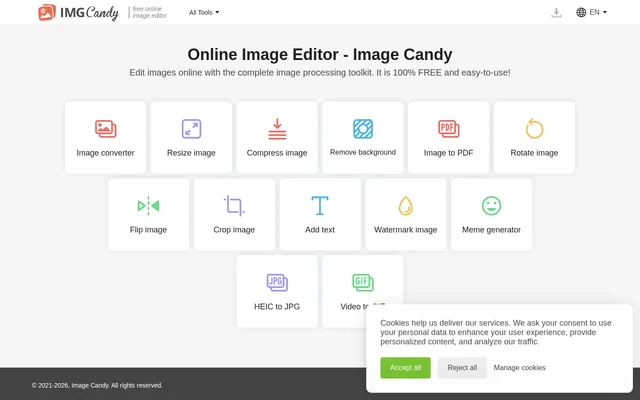
Image Candy is an online image editor that combines image processing and file conversion tools. Image Candy is intended for people who need to change image dimensions, adjust image orientation, add text, or convert visual files. The website presents these functions together as an image processing toolkit.
Image Candy lists tools for editing an image’s appearance alongside tools for changing its format. Background removal, watermarking, and meme generation sit alongside image compression and conversion. The listed capabilities also extend to creating PDF files from images and GIF files from video.
What Image Candy can do
Image Candy covers image adjustments, text additions, and format conversion through separately named tools. The website lists both general image conversion and specific conversion paths, including HEIC to JPG. Image Candy also includes video-to-GIF conversion alongside the image-focused functions in its toolkit.
- Image Candy converts image formats, including HEIC to JPG.
- Image Candy resizes and compresses images.
- Image Candy removes image backgrounds.
- Image Candy rotates, flips, and crops images.
- Image Candy adds text and watermarks to images.
- Image Candy converts images to PDF.
- Image Candy generates memes.
- Image Candy converts video to GIF.
How Image Candy works
Image Candy presents its editing functions as an online toolkit, with named options for tasks such as resizing, compression, background removal, and conversion. Users can identify the relevant function from those tool names. The supplied page does not describe the subsequent upload, editing, or download steps.
Image Candy lists English, Deutsch, Français, Italiano, Español, and Nederlands as website language options. The supplied page also contains plan-selection options. Image Candy does not explain in this text how plan selection relates to access to individual editing or conversion tools.
Who Image Candy is for
Image Candy is relevant to people looking for online tools to edit images or change file formats. The listed functions support tasks involving image size, orientation, backgrounds, and text. Image Candy also serves users whose immediate goal is a specific conversion, such as HEIC to JPG or video to GIF.
- Image Candy supports resizing and compressing images.
- Image Candy supports adding text or watermarks to images.
- Image Candy supports creating memes and converting video to GIF.
- Image Candy supports converting images to PDF.
Image Candy strengths and information limits
Image Candy brings editing, background removal, text additions, and conversion into the same online toolkit. The range of named functions is a concrete strength for users with different image tasks. However, the supplied page provides only tool names and brief pricing labels, leaving workflow details and the relationship between free access and paid plans unspecified.
Image Candy FAQ
What is Image Candy?
Image Candy is an online image editor and image processing toolkit. Image Candy lists tools for conversion, resizing, compression, background removal, cropping, rotation, text overlays, watermarking, meme generation, and video-to-GIF conversion.
Can Image Candy remove backgrounds and add watermarks?
Image Candy lists both background removal and image watermarking tools. Image Candy also includes an add-text tool, alongside options for cropping, rotating, flipping, resizing, and compressing images.
What file conversions does Image Candy offer?
Image Candy lists an image converter, HEIC-to-JPG conversion, image-to-PDF conversion, and video-to-GIF conversion. The supplied page does not identify the other file formats supported by the general image converter.
What languages does Image Candy list?
Image Candy lists English, Deutsch, Français, Italiano, Español, and Nederlands as website language options. These correspond to English, German, French, Italian, Spanish, and Dutch on the supplied page.
From the community
No reviews yet
Be the first to review this tool. What you write helps the next person choose.