What is Video Candy?
Video Candy is an online video editor that brings together tools for editing, converting and recording video. Video Candy is for people who need to make changes such as trimming clips, merging videos or adjusting dimensions online. The website advertises free use and also lists paid plans, with separate tools covering visual edits, audio changes, playback adjustments and slideshow creation.
What Video Candy can do
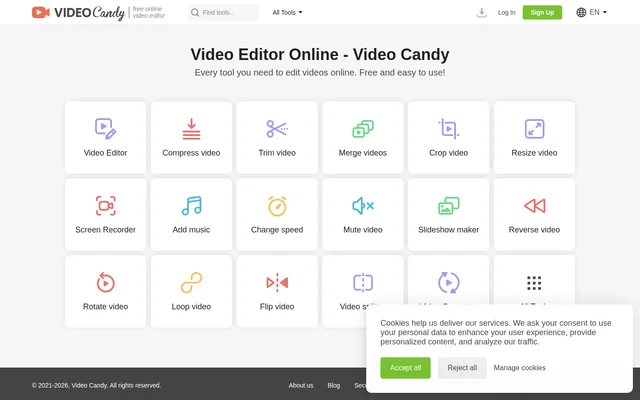
Video Candy provides both a video editor and a collection of tools named for specific tasks. The available options cover changes to video length, file size, framing, sound and playback. Video Candy also lists a screen recorder, a slideshow maker and a video converter, extending the selection beyond editing existing clips.
- Video Candy trims, splits and merges videos.
- Video Candy compresses videos and converts video files.
- Video Candy crops, resizes, rotates and flips videos.
- Video Candy adds music to videos and mutes video audio.
- Video Candy changes playback speed, reverses videos and loops videos.
- Video Candy includes screen recording and slideshow creation tools.
How Video Candy works
Video Candy presents an online video editor alongside individual tools such as Compress video, Trim video and Merge videos. Users can select the tool corresponding to their editing task. Video Candy provides sign-in options through Google, Apple or email, as well as an email-based password reset process. The website also offers a plan selector for yearly, monthly or lifetime access.
Who Video Candy is for
Video Candy is suited to people looking for online tools for common video editing tasks. The listed capabilities cover shortening footage, combining clips, changing video dimensions and adjusting audio or playback. Video Candy also supports people who want to record their screen or make a slideshow, without identifying a particular profession or industry as the intended audience.
- Video Candy can shorten footage with trimming and splitting tools.
- Video Candy can combine separate videos with its merge tool.
- Video Candy can adjust framing and dimensions with cropping and resizing tools.
- Video Candy can change a video's soundtrack by adding music or muting audio.
Video Candy strengths and limitations
Video Candy combines a range of video tasks with monthly, yearly and lifetime purchase options. Paid plans explicitly include watermark-free output and unlimited downloads, but also specify upload and processing limits. Video Candy provides a Help Center and says technical support will respond within 2 business days when the support system cannot resolve an order issue.
- Video Candy paid plans accept uploaded files up to 8 GB.
- Video Candy paid plans specify a 20 min processing time limit.
- Video Candy offers a full refund within 30 days only for recurring errors that cannot be resolved within a reasonable period.
Video Candy FAQ
What is Video Candy?
Video Candy is an online video editor with tools for trimming, merging, compressing, cropping, resizing and converting videos. Video Candy also includes a screen recorder, slideshow maker and tools for changing audio and playback.
Is Video Candy free?
Video Candy advertises free use and also offers yearly, monthly and lifetime paid plans. Video Candy lists watermark-free output, unlimited downloads, high-priority processing and a video editor plus 70 tools as included paid-plan benefits.
What are Video Candy's upload and processing limits?
Video Candy lists an upload limit of 8 GB per file and a 20 min processing time limit for its paid plans. Video Candy includes these same limits in the yearly, monthly and lifetime plan descriptions.
Can Video Candy record a screen or make slideshows?
Video Candy includes a Screen Recorder and a Slideshow maker in its tool list. Video Candy also offers a video editor and individual tools for compression, trimming, merging, cropping, resizing and conversion.
Does Video Candy offer refunds?
Video Candy offers a full refund within 30 days if users regularly encounter errors and the problems cannot be resolved within a reasonable period. Video Candy directs order-related support requests to its Help Center.
From the community
No reviews yet
Be the first to review this tool. What you write helps the next person choose.