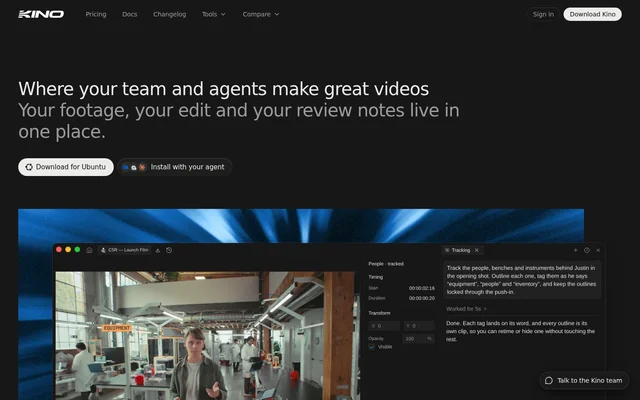
What is Kino?
Kino is a collaborative video editor and media manager for people working with video footage individually or as a team. Kino combines a local editing workflow with real-time collaboration and optional AI capabilities. The application lists Web, macOS, Windows, and Linux support. Kino's editing agent reads footage, makes an edit, and leaves every clip on the timeline so the editor can move clips afterward.
What Kino can do
Kino combines timeline editing with footage organization, agent connections, and paid AI tools. The free offering includes the full editor and collaboration, while upgrades add footage indexing, conversational editing, and link-based sharing. Kino's AI credits power transcription, scene detection, semantic search, chat, and motion graphics generation.
- Kino supports unlimited imports and exports in the free editor.
- Kino enables real-time collaboration and connects agents via MCP.
- Kino transcribes, describes, and indexes footage for search.
- Kino builds rough cuts through conversation.
- Kino generates motion graphics on demand.
- Kino makes timelines and assets shareable as streamable URLs.
How Kino works
Kino lets editors ask an agent for a cut, which the agent creates after reading the footage. Kino keeps the resulting clips on the timeline for manual changes. For sharing, Kino transcodes source footage into 720p proxies and backs those proxies up to the cloud. Collaborators stream the proxy footage through shared URLs when local files are unavailable, with storage measured by the amount of hosted proxy footage.
Who Kino is for
Kino serves video editors who need a local editing environment and teams that collaborate around footage, assets, and timelines. Kino's free editor supports importing, editing, exporting, and real-time collaboration. Paid capabilities address workflows involving conversational rough cuts, searching indexed footage, sharing streamable media, and generating motion graphics.
- Kino supports local video editing with unlimited imports and exports.
- Kino helps teams collaborate on video projects in real time.
- Kino supports footage discovery through transcription and semantic search.
- Kino enables review and access through shareable timeline and asset links.
Kino pricing and plans
Kino offers the full editor free forever, including unlimited imports and exports, real-time collaboration, and connections to any agent via MCP, without requiring a credit card. Paid upgrades add shareable links, searchable footage, and AI editing. Kino measures AI credits in hours of footage, with an allowance that resets each billing cycle. Usage beyond a plan's allowance is billed at on-demand rates rather than cut off. Kino allows cancellation from account settings, with access continuing through the end of the billing period.
Kino strengths and limitations
Kino combines a free local editor with collaboration and MCP agent connections, while preserving manual control over clips after agent-generated edits. Kino also supports streaming proxy footage when collaborators lack local files. The distinction between free editing and paid sharing, search, and AI features is important when evaluating Kino for a team workflow.
- Kino reserves shareable links, searchable footage, and AI editing for paid upgrades.
- Kino bills overages at on-demand rates.
- Kino bases cloud storage usage on the amount of hosted proxy footage.
Kino FAQ
What is Kino?
Kino is a collaborative video editor and media manager with AI-powered search, agentic editing, and real-time collaboration. Kino lists support for Web, macOS, Windows, and Linux, and keeps agent-edited clips on the timeline for manual adjustment.
Is Kino free?
Kino offers the full editor free forever, including unlimited imports and exports, real-time collaboration, and connections to any agent via MCP. Kino requires no credit card for the free offering; paid upgrades add sharing, searchable footage, and AI editing.
What can Kino's AI editing tools do?
Kino can build rough cuts through conversation and generate motion graphics on demand. Kino's agent reads footage, makes an edit, and leaves clips on the timeline for manual changes. AI credits also power transcription, scene detection, semantic search, and chat.
Does Kino support MCP agents?
Kino includes connections to any agent via MCP in the free offering, alongside the full editor, unlimited imports and exports, and real-time collaboration. Kino separately lists built-in AI editing among the capabilities available through an upgrade.
How does Kino share footage with collaborators?
Kino makes timelines and assets available as shareable URLs through a paid upgrade. Kino transcodes footage into 720p proxies and backs them up to the cloud, allowing collaborators to stream proxies when local files are unavailable.
How do Kino AI credits and overages work?
Kino measures AI credits in hours of footage and uses them for transcription, scene detection, semantic search, chat, and motion graphics generation. Kino resets the included monthly amount each billing cycle and bills excess usage at on-demand rates without cutting off access.
From the community
No reviews yet
Be the first to review this tool. What you write helps the next person choose.