What is PhotoFairy?
PhotoFairy is an AI photo editor and graphic design tool built around an infinite canvas. PhotoFairy serves people who want to edit an existing picture, generate an image from text or a sketch, or combine photos, shapes, and text in a layout. The canvas brings photo editing and graphic composition into the same workspace.
What PhotoFairy can do
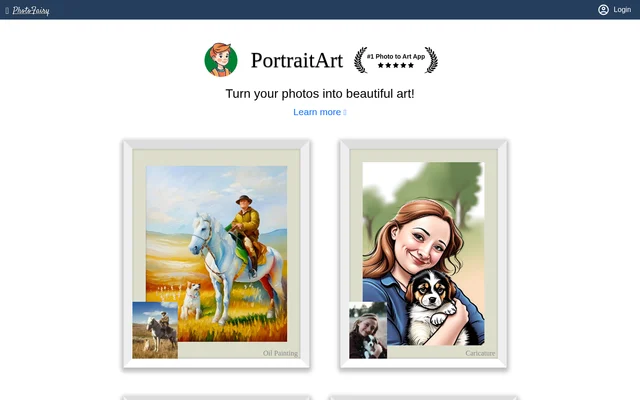
PhotoFairy combines conventional design tools, including fonts, drawing, and shape composition, with AI tools that generate or modify images. Standard features cover both editing and image generation. Premium features add effects such as image reimagination, which creates variations on an existing image, and photo-to-art conversion.
- PhotoFairy can cut out objects, remove backgrounds, and refine edges.
- PhotoFairy can remove unwanted objects and fill the affected area.
- PhotoFairy generates images from text prompts or scribbles.
- PhotoFairy can upscale images, colorize photos, and enhance faces.
- PhotoFairy supports freeform drawing, curves, and shape composition.
How PhotoFairy works
PhotoFairy supports a workflow in which users separate parts of an image and rearrange them on the canvas. For example, a user can cut out a subject, refine its edges, and place text behind it. PhotoFairy also supports selective edits and picture extension. Computationally intensive AI jobs run in the cloud, and the credits charged depend on the job.
Who PhotoFairy is for
PhotoFairy is suited to people who want to retouch photos, make artwork from a personal image, or assemble graphic layouts. The examples range from a single edit, such as changing the sky, to projects that combine images, text, and shapes. The canvas also supports visual experiments such as double exposure and clipped portraits.
- Create infographics or screen mockups.
- Visualize landscaping ideas.
- Turn sketches into finished images.
- Make personalized artwork from photographs.
PhotoFairy pricing and plans
PhotoFairy offers a Free plan with 100 complimentary AI credits at registration, standard features, and up to 5 designs. Pro costs $10 per month or $8 per month billed annually and includes 1000 AI credits per month. Max costs $20 per month or $16 per month billed annually and includes 3000 AI credits per month. Both subscriptions include premium features, unlimited designs, and technical support.
PhotoFairy also sells 1000 prepaid AI credits for $20. Prepaid credits are valid for 1 year and can supplement a subscription when monthly credits run out. If an account has both types of credits, PhotoFairy uses monthly credits first. The subscriptions can be canceled at any time.
Strengths and limitations
PhotoFairy makes several core editing and generation tools available on the free plan, including cutout, edge refinement, and generative fill. At default settings, cutout and edge refinement do not consume AI credits. When a subscription is canceled, PhotoFairy moves the account to the Free plan and keeps previously created designs accessible.
- The Free plan limits users to 5 designs.
- Photo-to-art conversion and cartoon effects are premium features.
- Unused monthly AI credits do not carry over.
- Prepaid AI credits are valid for 1 year.
Getting started with PhotoFairy
PhotoFairy provides a free signup and an introductory video on its welcome page. After registration, users can try the standard tools with a photo, a text prompt, or a scribble. The pricing page lists default credit charges by task, so users can check how much an operation such as image generation or generative fill costs before using it.
PhotoFairy FAQ
What is PhotoFairy?
PhotoFairy is an AI photo editor and graphic design tool with an infinite canvas. PhotoFairy supports background removal, image generation from text or scribbles, selective editing, and layouts made with text, shapes, and images.
Is PhotoFairy free?
PhotoFairy offers a Free plan with 100 complimentary AI credits at registration, access to standard features, and up to 5 designs. The paid Pro and Max plans add premium features, unlimited designs, technical support, and monthly AI credits.
Can PhotoFairy remove backgrounds and unwanted objects?
PhotoFairy can remove backgrounds and unwanted objects. PhotoFairy provides object cutout and edge refinement for separating a subject from its background, as well as simple object removal and removal with inpainting for filling the affected area.
Can PhotoFairy turn photos into art?
PhotoFairy can turn photographs into artwork through its premium photo-to-art feature. PhotoFairy also lists cartoon effects, sketch drawing, and image reimagination among the premium features available on the Pro and Max plans.
Do PhotoFairy AI credits roll over?
PhotoFairy does not roll unused monthly AI credits into the next month. Prepaid credits are valid for 1 year and can be used alongside a subscription. PhotoFairy uses the monthly balance before drawing from prepaid credits.
From the community
No reviews yet
Be the first to review this tool. What you write helps the next person choose.