What is Bing Create?
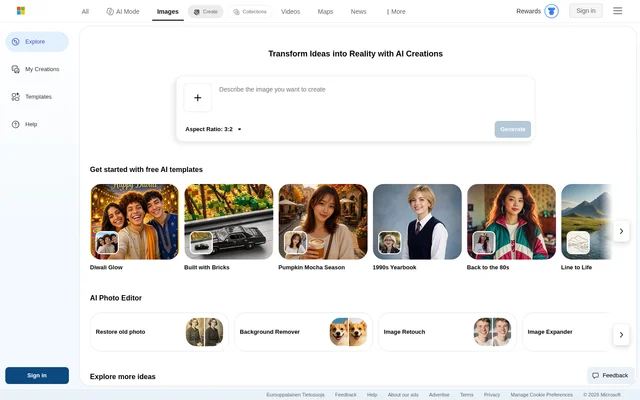
Bing Create is an AI image and video creation tool for turning ideas into visual content and changing existing pictures. Bing Create combines generation controls with prompt suggestions, themed templates and photo-editing options. The page supports both creating new images and working with uploaded photographs, including enhancement, mixing and reimagining.
Bing Create provides inspiration through subject categories such as architecture, animals, illustration, character design, food and travel. These categories give people starting points for exploring visual styles and subjects. Free templates include professional portraits, travel posters, knitting art and other themed treatments shown on the page.
What Bing Create can do
Bing Create offers image generation, video creation and several ways to modify photographs. Bing Create includes controls for image proportions and output quantity, alongside ideas that help users develop prompts. The editing tools cover both changes to an existing picture and treatments that rework its appearance.
- Bing Create generates AI images from prompts.
- Bing Create offers AI video creation.
- Bing Create enhances, mixes or reimagines uploaded pictures.
- Bing Create provides square, landscape and portrait aspect ratios.
- Bing Create lists tools for photo restoration, background removal and retouching.
- Bing Create includes image expansion and enhancement tools.
How Bing Create works
Bing Create presents a New Creation option as the starting point, with image and video choices available on the page. Users can explore suggested prompts, change a prompt and adjust image settings before creating. Bing Create asks users to sign in to use personal prompts and unlock image uploads.
Bing Create displays generation progress and provides controls for sharing, downloading, editing and saving results. Creation times can vary: the page includes video waiting messages ranging from minutes to hours. Bing Create also warns that image creation may become slower after the day's fast creations have been used.
Who Bing Create is for
Bing Create is suited to people who want to generate visual content or update existing photographs using AI. Bing Create provides examples across personal photo treatments, digital illustration, decorative imagery and travel-inspired designs. The page offers templates and suggested prompts for people who want a starting point rather than a blank prompt.
- Bing Create supports creating travel-poster imagery.
- Bing Create offers old-photo restoration and image retouching.
- Bing Create provides ideas for character design and concept art.
- Bing Create includes wallpaper and home-decor inspiration.
Bing Create pricing and free access
Bing Create advertises free AI creations, including 10 free creations in fast mode and unlimited creations in standard mode. Bing Create also lists free upgrades through Microsoft Rewards. Signing in unlocks additional models and more creation access, while guest usage is subject to daily limits that reset each day.
Bing Create strengths and limitations
Bing Create brings image generation, video creation, editing tools and visual inspiration together on the same page. Free creation options and preset formats provide several ways to begin. Bing Create also discloses access restrictions and image-upload privacy considerations, including that submitted images may be used to improve Bing image-processing services.
- Bing Create requires sign-in for personal prompts and uploads.
- Bing Create applies daily guest limits and capacity restrictions.
- Bing Create is unavailable in some countries or regions.
- Bing Create may block prompts or suspend access for content-policy violations.
- Bing Create advises users not to upload other people's pictures without consent.
Bing Create FAQ
What is Bing Create?
Bing Create is a free AI image and video creation tool with additional photo-editing options. Bing Create supports generating visuals, enhancing or reimagining uploaded pictures, and exploring templates and suggested prompts across subjects such as illustration, architecture and travel.
Is Bing Create free?
Bing Create advertises free access with 10 fast-mode creations and unlimited standard-mode creations. Bing Create also offers free upgrades through Microsoft Rewards. Guest creation has daily limits, while signing in unlocks additional models and more creation options.
Do you need to sign in to use Bing Create?
Bing Create offers guest creation with daily limits, but requires sign-in for personal prompts and image uploads. Bing Create also asks users to sign in to create more and unlock additional models for free.
Can Bing Create edit existing photos?
Bing Create supports enhancing, mixing and reimagining uploaded pictures. Bing Create also lists tools for old-photo restoration, background removal, retouching, image expansion and enhancement. Uploaded pictures may be used to improve Bing image-processing services.
Why is Bing Create slow or unavailable?
Bing Create can slow down after daily fast creations are exhausted, and guest creation may reach daily capacity. Bing Create also lists temporary service outages, regional availability restrictions and content-policy blocks as reasons creation may be unavailable.
From the community
No reviews yet
Be the first to review this tool. What you write helps the next person choose.