What is Bing Image Creator?
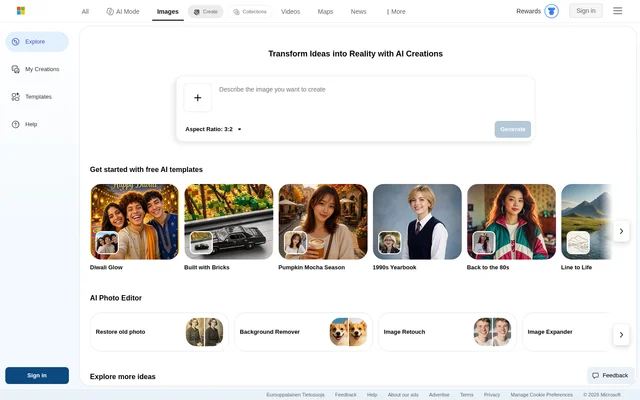
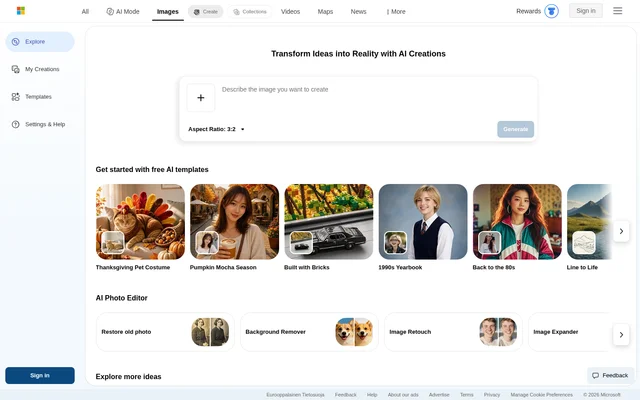
Bing Image Creator is an AI image generator and photo editor for people who want to create visuals from a description or change an existing picture. The Bing page combines image creation settings, example prompts, and photo editing tools. It also points users to Bing’s video creation tool for generating AI videos.
What Bing Image Creator can do
Bing Image Creator supports both generating a new image and editing an existing one. For new images, users can choose an aspect ratio and set how many results to generate. For existing pictures, the page describes tools for improving or remixing an upload, including options that restore photos or change the framing.
- Generate images from text prompts.
- Choose square, landscape, or portrait proportions.
- Set how many images to generate.
- Restore old photographs.
- Remove backgrounds or retouch images.
- Expand or enhance an existing image.
- Generate AI videos through Bing’s video creation tool.
How Bing Image Creator works
Bing Image Creator offers prompt suggestions that users can refresh and try. Signing in lets users enter their own prompts and upload images. After generating an image, users can edit the prompt and generate another version, or use the controls to share, save, download, or edit the result. The settings also let signed-in users show or hide the visible watermark.
Who Bing Image Creator is for
Bing Image Creator is for people exploring visual ideas as well as those who already have a photo they want to revise. The page’s examples span travel posters, pixel art, character design, concept art, and wallpaper. The photo tools cover a different set of tasks, such as restoring an old picture or removing its background.
- Create a travel poster.
- Explore character designs and concept art.
- Generate pixel art or wallpaper.
- Restore an old photo or remove its background.
Bing Image Creator pricing and plans
Bing Image Creator offers free generation, with visitor limits that reset daily. The page lists 10 free fast-mode creations and unlimited creations in standard mode. Once users run through the day’s fast creations, new generations can take a few minutes. Signing in unlocks additional models at no charge, and the page lists free upgrades through Microsoft Rewards.
Bing Image Creator strengths and limitations
Bing Image Creator offers prompt suggestions, adjustable output settings, and photo editing tools on the same page. Those options cover both starting from text and revising an image. The page cautions that submitted pictures may be used to improve Bing’s image processing services and that users should not share photos of other people without their consent.
- Visitor creation is subject to daily limits.
- Uploads, downloads, and custom prompts require sign-in.
- Image creation can slow down after the fast-mode allowance is used.
- The service may not be available in every country or region.
- Prompts and results can be blocked under the content policy.
Getting started with Bing Image Creator
Bing Image Creator shows a New Creation control and a gallery of prompt ideas. Users can try a suggested prompt or sign in to enter their own. Before generating, users can choose an aspect ratio and the number of images in the settings. To revise an existing picture instead, signed-in users can upload it and use the photo editing controls.
Bing Image Creator FAQ
What is Bing Image Creator?
Bing Image Creator is an AI image generator and photo editor. It generates images from text prompts and offers tools for editing uploaded pictures, including background removal, retouching, old photo restoration, image expansion, and enhancement.
Is Bing Image Creator free?
Bing Image Creator offers free creation, with 10 free fast-mode creations and unlimited standard-mode creations listed on the page. Visitors face daily limits that reset each day, and signing in unlocks additional models at no charge.
Do you need to sign in to use Bing Image Creator?
Bing Image Creator allows limited visitor creation, but signing in is required to use custom prompts, upload images, and download results. Signing in also unlocks additional models and lets users change the visible watermark setting.
Can Bing Image Creator edit existing photos?
Bing Image Creator can edit existing photos after users sign in and upload a picture. The page lists old photo restoration, background removal, retouching, image expansion, and enhancement as available photo editing tools.
Can Bing Image Creator generate videos?
Bing Image Creator links to Bing’s video creation tool for generating AI videos. The page distinguishes video generation from image generation and shows separate progress messages indicating that a video may take minutes or hours to complete.
From the community
No reviews yet
Be the first to review this tool. What you write helps the next person choose.